Cron and Job Alert Kit

Your scheduled job didn't run. Know in minutes, not five days later.

GitHub Actions cron, Vercel Cron, Cloudflare Cron Triggers, n8n: when a schedule silently stops firing, no run fails — so no failure alert can fire. This kit is a dead-man's-switch heartbeat Worker you deploy on your own Cloudflare account: jobs ping it, and any job that stops pinging — including one that never ran at all — triggers an alert through your webhook, Telegram, or email. $28 once. No monthly bill.

Get the kit — $28
One-time payment · ≈ ฿970 · free updates for v1.x · instant download
Instant download · 30-day refund, no questions · human reply within a day · secure checkout by Stripe
Every Zicula kit ships with its own key art — this one's yours.

What's inside the kit

One zip, zero npm dependencies, zero vendor accounts: a single Cloudflare Worker plus copy-paste heartbeat snippets for the four stacks where silent schedules hurt most.

Never-ran detection

The alert a failed run can't send

Error handlers catch jobs that fail. Nothing catches a job that never starts — concurrency skips, deleted triggers, paused projects, drifted schedules. An armed monitor with zero pings flips to never-ran within period + grace.

Your infra

One Worker on YOUR Cloudflare account

npx wrangler deploy, done. Heartbeats and alert state live in your KV namespace, pings hit your workers.dev URL. Nothing phones home to us — there is no "us" to phone.

3 alert channels

Webhook + Telegram + email

Generic JSON webhook (Slack/Discord formats built in), your own Telegram bot, and email via your own Resend account. Configure any one — or all three. Recovery notices included.

Status + badges

/status page and SVG badges

A dependency-free status page shows every monitor's state, last ping, and recent pings — optionally token-protected. Embeddable /badge/<uuid>.svg for READMEs and wikis.

4 stacks covered

Copy-paste integration snippets

A full GitHub Actions workflow with success and fail heartbeats, Vercel Cron route patterns, Cloudflare Cron Trigger patterns, an n8n recipe, and a generic shell wrapper for crontab.

Tested logic

Selftest runs in plain Node

node worker/selftest.mjs runs 18 logic tests — never-ran, late, missed, failing, recovery, cooldown — before you deploy anything. The build itself runs them against the shipped bytes.

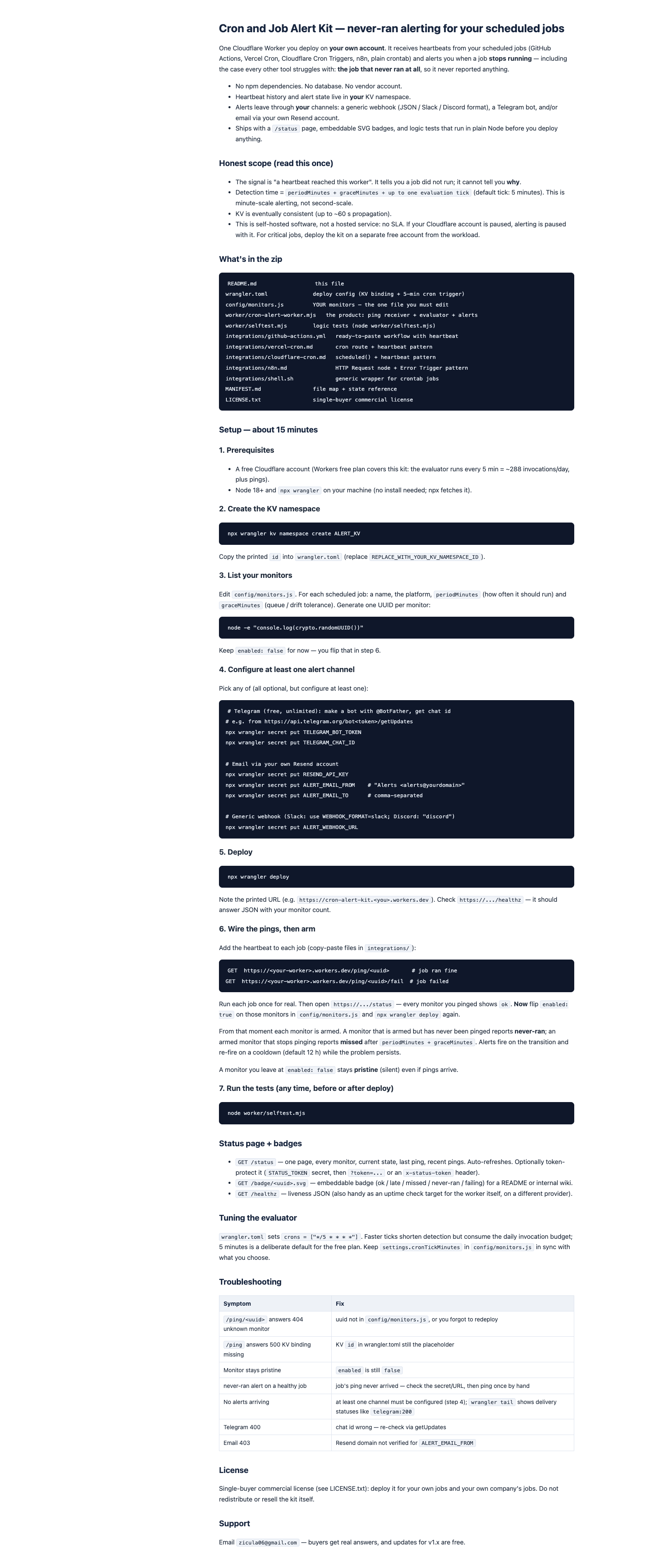
README quickstart guide
README quickstart — 15 minutes, step by step
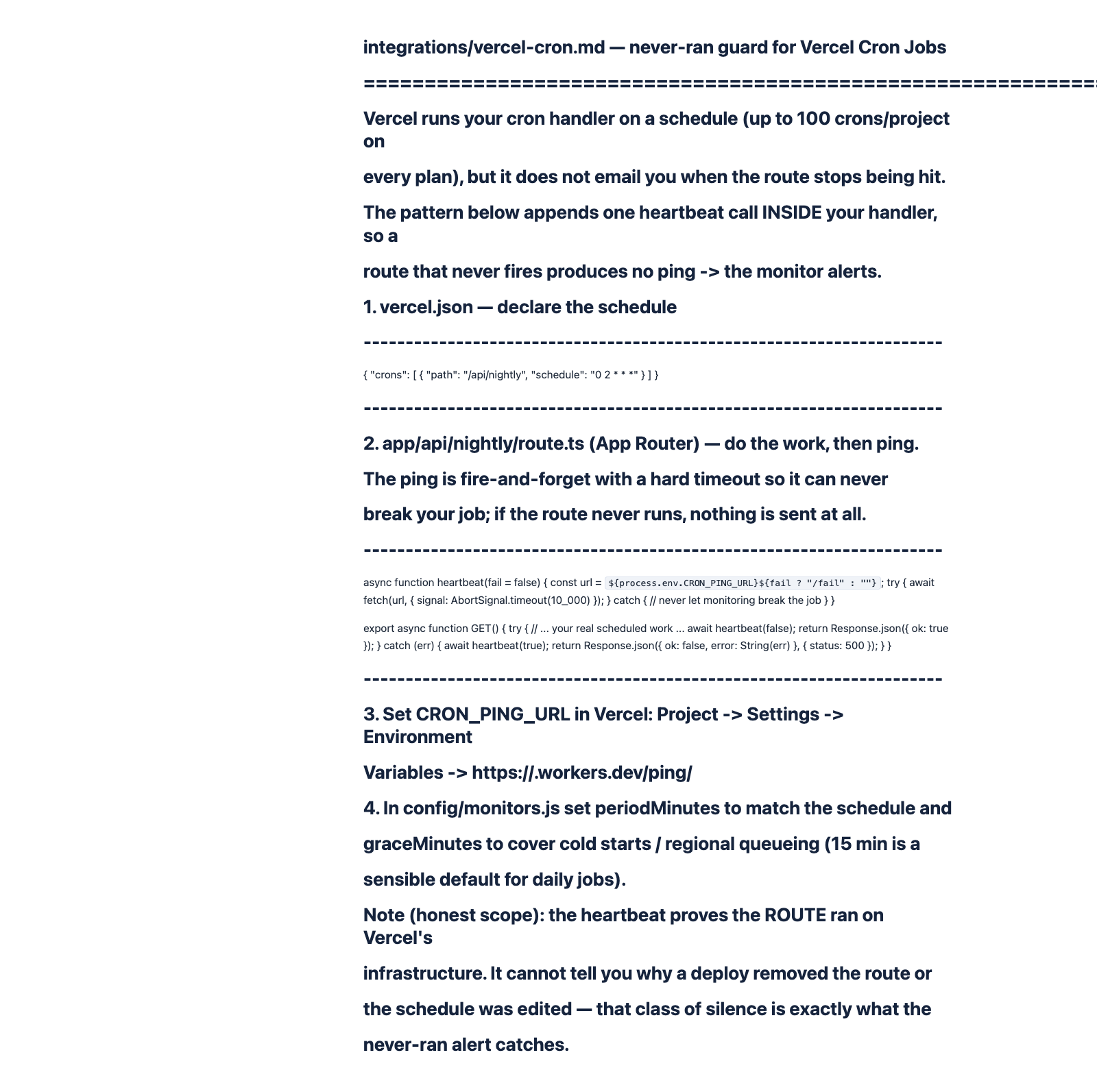
Vercel Cron heartbeat pattern
The Vercel Cron heartbeat pattern
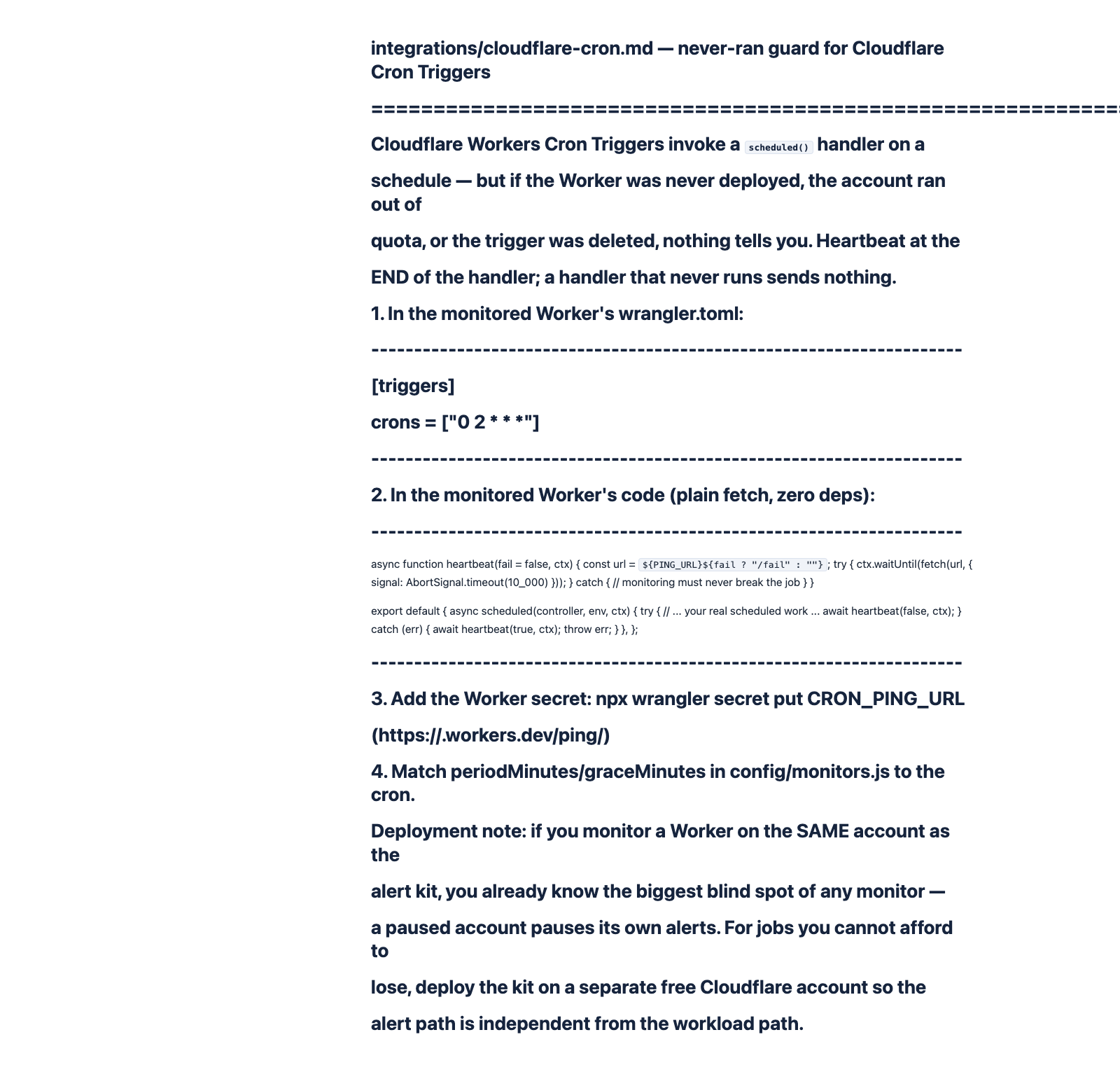
Cloudflare Cron Trigger pattern
The Cloudflare Cron Trigger pattern
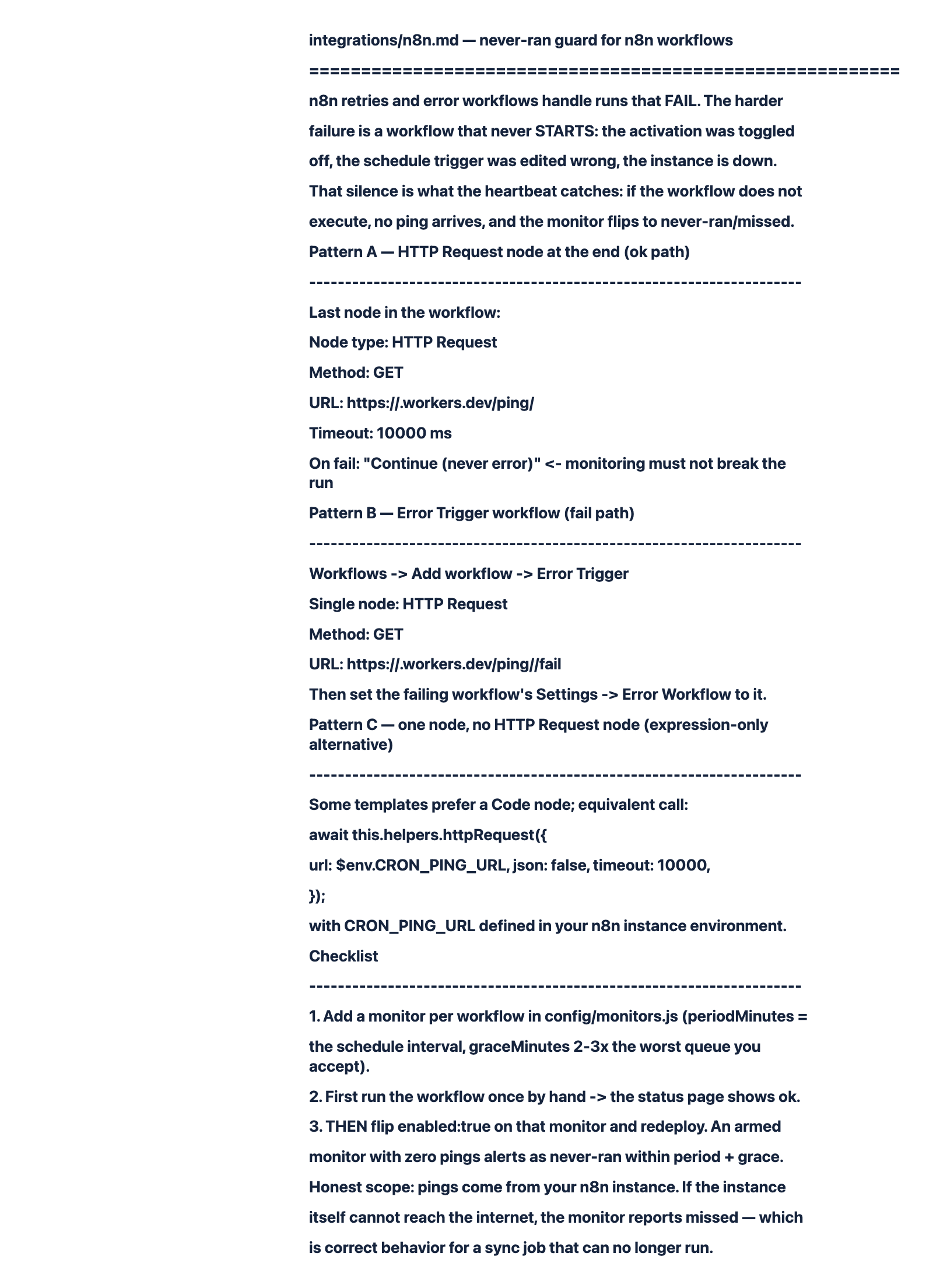
n8n recipe
The n8n recipe + arm-after-first-run checklist
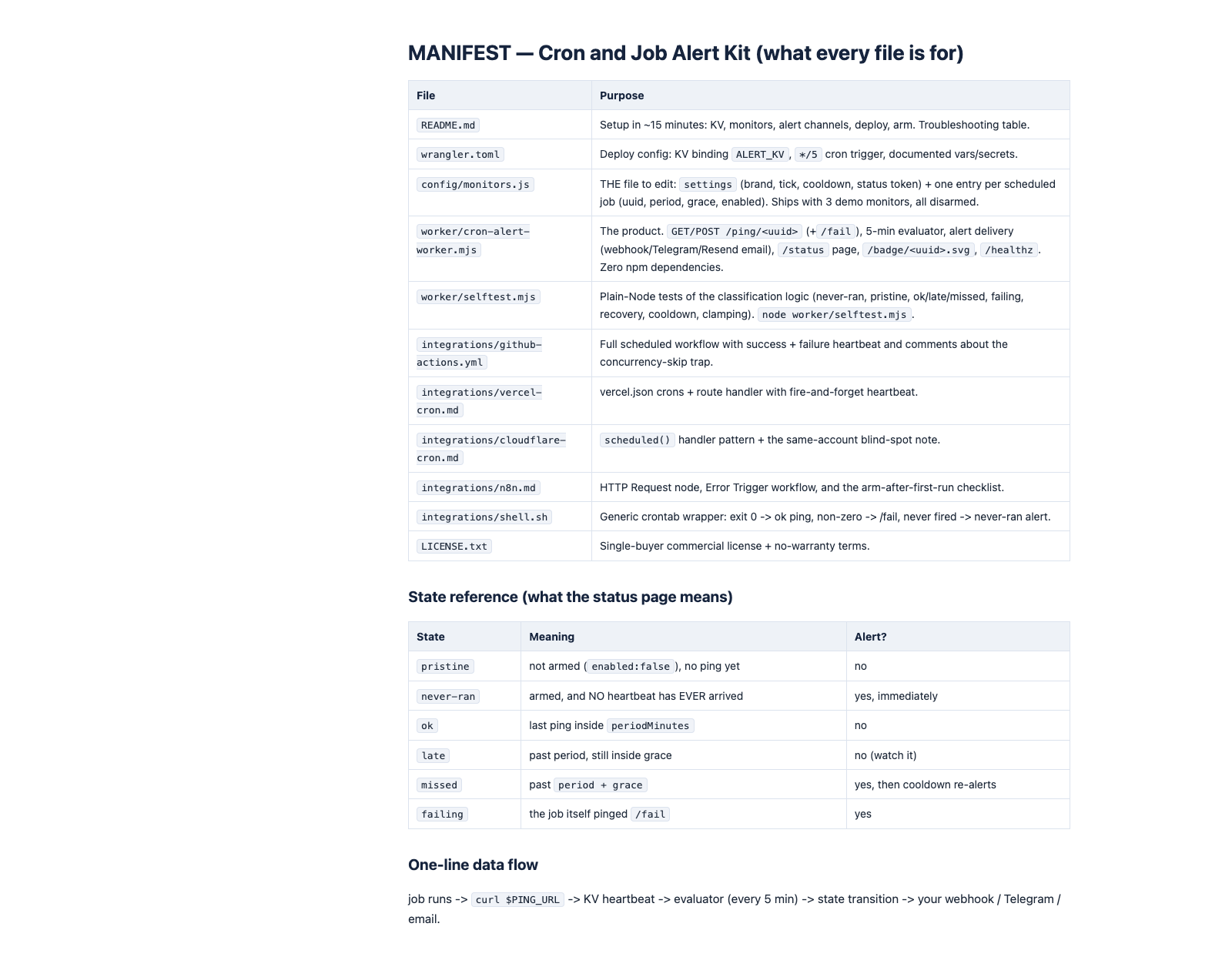
MANIFEST file map
MANIFEST — what every file is for

Real files from the zip, rendered as-is — no mockups.

Who's behind this?

Zicula is a one-person studio — hi, I'm Zic. Every kit here, including this one, is written, tested and shipped through documented process, and the support email is answered by me, not a helpdesk. This store's own build, QA and deploy pipeline runs on the same kind of SOPs and checklists we sell.

  • Free sample, instant download — no email required.
  • 30-day refund, processed in Stripe — no forms, no interrogation.
  • Free updates forever — full history in the store changelog.
  • Real human support: [email protected]

Not sure yet? Try a free sample

Three real pieces from the kit, trimmed to taste: the monitors config with its full settings block and one of three demo monitors, the GitHub Actions integration with its success heartbeat, and the state classifier excerpted straight from the Worker. Instant download — no email needed.

Built for the stacks with the silent-schedule hole

Each platform retries and error-alerts failed runs. None of them alerts you when the schedule itself stops firing — that's the exact gap this kit closes.

GitHub Actions
cron workflows that concurrency skips or never start
Vercel Cron
routes removed by a deploy or an edited schedule
Cloudflare Cron Triggers
workers that were never redeployed or got paused
n8n
deactivated workflows and schedule triggers that drifted

How it works

Deploy once, add one line per job, arm the monitors. About fifteen minutes end to end.

Step 1

Deploy the Worker

Create a KV namespace, edit config/monitors.js (one entry per job: name, period, grace), run npx wrangler deploy. Free plan covers it.

Step 2

Add one heartbeat line per job

curl $PING_URL at the end of each job, curl $PING_URL/fail on failure. Copy-paste snippets for GitHub Actions, Vercel, Cloudflare, n8n, and shell are in the zip.

Step 3

Arm and forget

After each monitor's first real ping, flip enabled:true. From then on, a job that stops pinging alerts you through your own channels — and tells you when it recovers.

Honest scope, stated up front

It detects, it doesn't explain. The signal is "a heartbeat reached this worker". A never-ran alert tells you the job stopped running; it cannot tell you why — that diagnosis happens on your platform.

Minute-scale by design. Detection time is period + grace plus up to one evaluation tick (the evaluator runs every 5 minutes). This is dead-man's-switch alerting for scheduled jobs, not sub-second uptime monitoring.

Self-hosted means self-responsibility. Everything runs on your Cloudflare account with your secrets. No SLA comes with the kit — and if you monitor critical jobs, deploy it on a separate account from the workloads so the alert path stays independent.

One price. It's yours.

No subscription, no per-monitor fee, no event quota — hosted monitors bill monthly for exactly this.

$28 one-time payment

≈ ฿970

  • Unlimited monitors on your own Cloudflare free plan
  • Webhook + Telegram + email alerts through YOUR accounts
  • Snippets for GitHub Actions, Vercel, Cloudflare, n8n, shell
  • Free updates for v1.x · 30-day money-back

Secure checkout via Stripe · card payments · taxes calculated at checkout

Instant download · 30-day refund, no questions · human reply within a day · secure checkout by Stripe

Frequently asked questions

What exactly does "never-ran" alerting mean?

Every monitor in the kit watches for one event: a heartbeat. You arm a monitor after its job's first real ping. If an armed monitor has received no heartbeat at all — ever, or since period + grace elapsed — it alerts. That catches jobs whose schedules silently stopped firing, which failure handlers structurally cannot catch because no run ever happened.

How is this different from hosted cron monitors?

Hosted services charge every month, per monitor, and your heartbeat history sits in their database. This kit is a one-time purchase you self-host: your Worker, your KV, your alert channels, unlimited monitors for ฿0/month of tooling. You trade their convenience for ownership — that's the whole deal.

What do I need to run it?

A free Cloudflare account, Node 18+ on your machine for the one-time deploy, and at least one alert channel (a Telegram bot, a webhook URL, or a free Resend account for email). The Workers free plan comfortably covers the every-5-minutes evaluator plus your ping volume.

How fast does it detect a dead job?

Within periodMinutes + graceMinutes of the last expected ping, plus up to one 5-minute evaluation tick. A daily 02:00 job with 2 hours of grace is flagged by roughly 04:05 — same morning, not five days later when someone finally notices.

What does the license cover?

A single-buyer commercial license: one person or one company deploys it for all of their own jobs and internal services, forever. Redistributing or reselling the kit itself is not covered — each buyer needs a license.

What is the refund policy?

If the kit doesn't fit how you work, email [email protected] within 30 days of purchase and we'll refund you in full — the zip is yours to keep or delete. One refund per purchase; we only ask for optional feedback.

The next silent skip shouldn't be your discovery

$28 one-time · ≈ ฿970 · free updates v1.x · instant download

Get the Cron and Job Alert Kit — $28